Showing posts with label MSBI. Show all posts

Tuesday, 15 September 2015

Power Of POWER BI


Getting Started....
Microsoft Power BI is reach of features, rich graphics and supports numerous data sources.
To use MS Power BI features you have to signup here. https://powerbi.microsoft.com/

  1. User your organization Email Id for signing up. Microsoft will use your Organization Office 365 Licensing for this.
  2. It verifies your organization email id and Password.
  3. You will get free access but will be limited to few sources and samples only.
  4. To have full access you need to purchase Power BI Pro features.MS provide a 60 days trial pack for pro features :-)
  5. Once sign up it will take few seconds to setup a Power BI work environment for you.   
  6. Following which it will allow you to connect to you with multiple data source options within or outside your organizations


  1. Here I am creating a sample data source using Xlsx (Local File Source) as Source
  2. you will get following like environment


  1. It same as Excel Pivot with little bit different layout but more charts like MAPs.
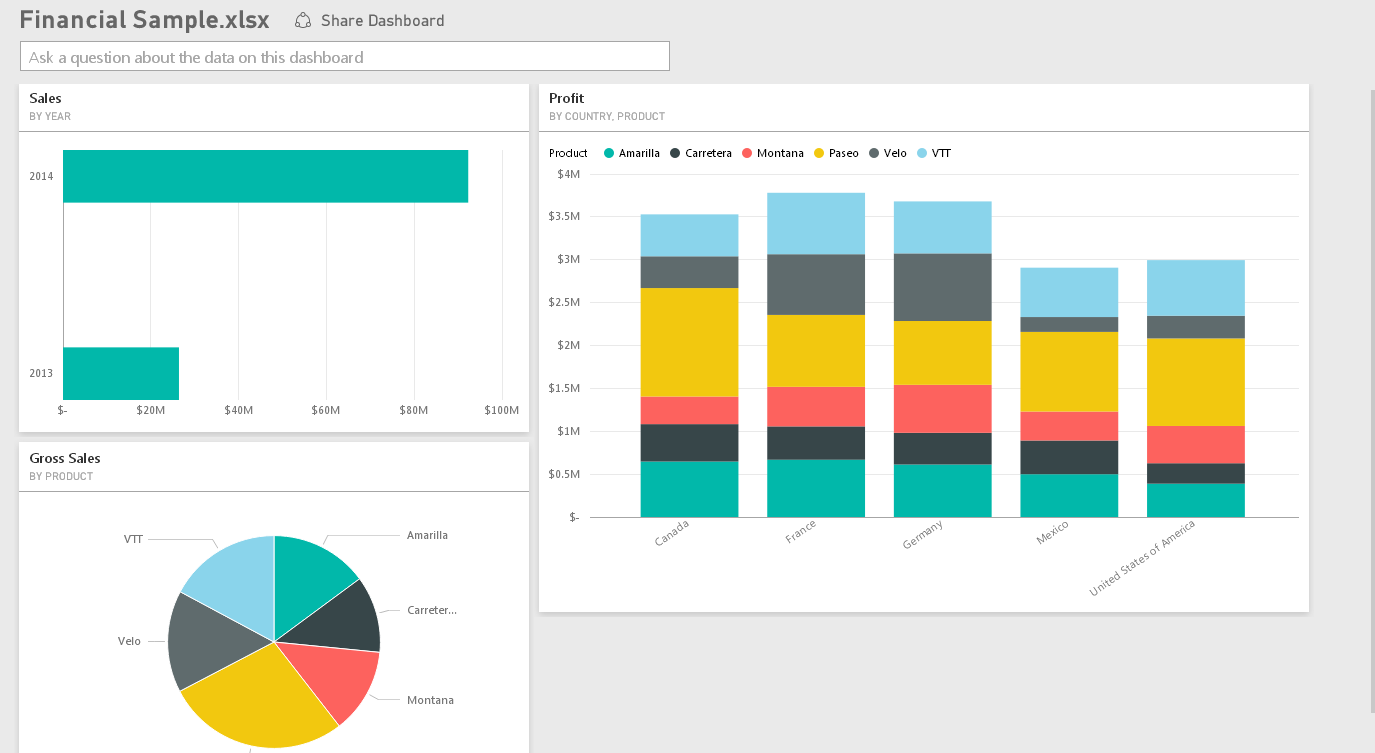
  2. Following is a sample report-


  1. Overall dashboards will look like


Well I have just started here. Please look for more on this in coming days…………………..


Monday, 20 July 2015

Normalization/ De Normalization in data warehousing


Now lot of places you will find of normalization definitions some of them are very technical and some seems to go beyond radar make you more confuse –
Here I have given it a try for making it simple –

Normalization 
For me normalization is simple, reduce redundancy, save some storage space and maintain consistency.
Removing redundancy helps OLTP system, as they have lot of UPDATES. Less rows to updates gives offcourse more performance.

De Normalization 
Though we don’t have any proper definition of term “De normalization” yet it’s been used frequently.
Let say de normalization will involve creating more attributes (columns) in one table. This will reduce the number join and can give better performance.

Star/Snow Flake and Normalized/De Normalized – What is what??

For me Star is less normalized so I’ll call it De Normalized.
If in real time system you have to maintain a Star Schema you will have to manage big/ huge dimensions.

Snow Flake is a Normalized;
You decompose relation ships here and create smaller structures. Example – Adventure work DW Product dimension.


So Big Question? - What to do when design for DWH –

Well I prefer to go with……….wait for it……………Reporting. Yes you heard it.
It’s not about normalization or de normalization. It’s about reporting and its performance.
Your End users don’t care whether you normalized or de normalized data, they just want to see their reports well with right numbers and fastest way possible.  In today’s time very handful of organization/customer/user will care for storage/space, all they want now is quickest reporting or analytics.


There are no fix rules of going Normalized will be better or vice a versa. Hence it is always based on your reporting and analytic requirement.  

Wednesday, 15 July 2015

Uing Custom assembly in SSAS


Sometimes default function and features of SSAS are not sufficient to fulfil the requirement. Therefore, Analysis Services lets you add assemblies to an Analysis Services instance or database. Assemblies let you create external, user-defined functions using any common language runtime (CLR) language, such as Microsoft Visual Basic .NET or Microsoft Visual C#. You can also use Component Object Model (COM) Automation languages such as Microsoft Visual Basic or Microsoft Visual C++.


Following is an example where we have used an assembly to create a custom drillthrough.

Requirement
Requirement is to have huge text column (BLOB) to be displayed when doing a drillthrough in SSAS using excel as tool.

Problem statement
  1. By default column which included into drillthrough needs to be present in cube. If we don’t have columns in cube we can not see then in drill through.
  2. Having huge text column into the cube will increase the cube storage as well will degrade the performance of cube. Also it will increase cube processing time.
 If we keep the required drillthrough columns in cube, our cube performance will be impacted, if don’t keep it we wont be able to drilldown on it usnign default drillthrough functionality.

Solution
Using an assembly
We come up with a solution where we will not keep the required BLOB columns into the cube, but will use an assembly to query background SQL DB and send a result back into excel.
  
  • A dot net based assembly having function to which will call database stored procedure or T SQL. This function will take MDX syntax based parameter as input.  

  • To make a call to this assembly use action tab of cube designer and use following kind of syntax –

Call MyAssembly.MyClass.MyFunction(a, b, c)

  • This function can internally (within assembly) call multiple functions.
  • Function will have a connection string to SQL DB. 
  • In Action tab select the return type as dataset. This will allow you to display return result in a new excel sheet.
  • This assembly and its function can be used in multiple ways, instead of returning a result set it can also return a web page URL or SSRS report URL. 
I have used assembly created by "https://asstoredprocedures.codeplex.com/" and used it as basic template. i modified it for my purpose and use.


Deploy
This assembly can be deployed using SQL Server Management Studio.

SSMS -> Expand Assemblies folder -> Right click -> Click on New Assembly -> it opens Register Server Assembly window -> choose type and through File Name add your assembly

Security
Whenever we use custom assembly we also faces security challenges.
By default SSAS provide a security options as follows -

                  
Permission Setting
Description
Safe
Provides internal computation permission. This permission bucket does not assign permissions to access any of the protected resources in the .NET Framework. This is the default permission bucket for an assembly if none is specified with the PermissionSet property.
ExternalAccess
Provides the same access as the Safe setting, with the additional ability to access external system resources. This permission bucket does not offer security guarantees (although it is possible to secure this scenario), but it does give reliability guarantees.
Unsafe
Provides no restrictions. No security or reliability guarantees can be made for managed code running under this permission set. Any permission, even a custom permission included by the administrator, is granted to code running at this level of trust.

Conclusion 
Using custom assembly is very easy. It lets you customized your cube/MDX in multiple ways. 

References  

Tuesday, 6 November 2012

MDX Function, few more


After the post MDX introduction and MDX function, here in the same series I am going to explain few more function which will be very frequent.


PeriodsToDate
Is a time based function; it gives you till period values from the start of the period. A period can be any time based period like Quarter, Week, Month and Year.
Function takes a level and a member as input parameter. Level is the level you want to travel and member is till that member.

SELECT
      {[Measures].[Internet Order Count]} ON COLUMNS,
      PeriodsToDate([Date].[Calendar].[Calendar Year],[Date].[Calendar].[Month].&[2006]&[8]) ON ROWS
FROM      [Adventure Works]   

So here result will give you all the values starting from month 1 of year 2006 to the Month 8 of year 2006.
Interesting, isn’t it??
Well more understating will be when it is user dynamic.
To do so we have to create a calculated value. For crating a calculated value we use WITH MEMBER.
Following is Syntax of 

WITH MEMBER [Measures].[YourMeasureName]
AS
<>

 Than normal SELECT Statement which uses above calculation in any of their AXIS
Hear it how it comes together -

WITH MEMBER [Measures].[Internet Order Count YTD]
AS
aggregate(
PeriodsToDate([Date].[Calendar].[Calendar Year], [Date].[Calendar].currentmember)
,[Measures].[Internet Order Count]
)    

SELECT
      {[Measures].[Internet Order Count],[Measures].[Internet Order Count YTD]} ON COLUMNS,
      [Date].[Calendar].[Month] ON ROWS
FROM [Adventure Works]
WHERE {[Date].[Calendar Year].&[2007]}

Here we have simple used PeriodsToDate With in a calculation.
Here instead of a member we have used currentmember. This current member will help us calculate will you for every rows means for every member of Month attribute.
When you run this query result will give you cumulative of internet Order counts till year end.

Another important Time period based function is

PARALLELPERIOD

Return a data for  a period in the same relative position as a specified member, this period can be before or upcoming based on the input given.

SELECT

    PARALLELPERIOD([Date].[Calendar].[Calendar Year],1, [Date].[Calendar].[Month].&[2010]&[9]) ON COLUMNS
     
FROM [Adventure Works]

We can also have dynamic query here as well, see following

WITH MEMBER [Measures].[Internet Order Count PP]
AS
aggregate(
PARALLELPERIOD([Date].[Calendar].[Calendar Year],1, [Date].[Calendar].currentmember)
,[Measures].[Internet Order Count]
)    

SELECT
      {[Measures].[Internet Order Count],[Measures].[Internet Order Count PP]} ON COLUMNS,
      [Date].[Calendar].[Month] ON ROWS
FROM [Adventure Works]
WHERE {[Date].[Calendar Year].&[2010]}

Hope this will help you understand basic of MDX and also some of the Important MDX functions. 

Saturday, 3 November 2012

MDX Functions


Once you know basics we can have look at the basic functions and properties of MDX.
I hope you have read the previous blog MDX  Introduction.  

In the last post I have shown you a very basic MDX, it just show one member, if you want to see all the members than

SELECT {[Measures].[Internet Sales Amount]} ON COLUMNS,
[Date].[Calendar Year].ALLMEMBERS on 1
FROM [Adventure Works]

Using . ALLMEMBERS to a dimension attribute will give you all the members of that attributes.

Just like this we have some more properties and function

PREVMEMBER
 Gives you previous member of a Dimension Member.  

SELECT {[Measures].[Internet Sales Amount]} ON COLUMNS,
[Date].[Calendar Year].&[2009].PREVMEMBER on 1
FROM [Adventure Works]

So you will get data across Year 2008.

RANGE
Range is not a function but it’s a way of writing MDX, by which you can see data for a range of dimension member.  
SELECT {[Measures].[Internet Order Count]} on 0,
{[Date].[Calendar Year].&[2005]:[Date].[Calendar Year].&[2007]} on 1
FROM [Adventure Works]

FILTER
If you want to filter data on Axis based on a condtion you can use filter function.  Like following
SELECT [Measures].[Internet Sales Amount] ON 0,
FILTER
(
[Date].[Date].[Date].MEMBERS
, [Measures].[Internet Sales Amount]<10000 o:p="o:p">
) ON 1
FROM [Adventure Works]

FILTER takes a set and a condition as input parameter.
In above example we are showing all the dates for which we have Internet sales amount more than 10000.
Instead of a measure you can also have Dimensions as Filter condition.

EXCEPT
Same as FILTER there is Except
--Except

SELECT [Measures].[Order Quantity]
   ON COLUMNS,
   Except
      ([Product].[Product Categories].[All].Children ,
         {[Product].[Product Categories].[Components]}
      ) ON ROWS
FROM
   [Adventure Works]

It gives you result except the condition, so its other way around of Filter.
So it takes a set and a condition as input parameter, but here result will exclude the condition and gives you result.
This are few function I have explained you above, in next post will see more of those. 

Tuesday, 3 July 2012

Microsoft SQL Server 2012: changing course of BI


With the resale of SQL Server 2012, Microsoft is taking himself one step ahead in BI market.
In this resale we have seen significant improvement in Microsoft BI Stack including IS, AS, RS and Self Service BI.  
But here I am not going to talk about the improvement Microsoft is doing in his product.
Here I would like to explain how it can change the BI implementation thinking.

Earlier
Following is traditional BI cycle.


In a typical BI implementation see above Pic, We usually build a Enterprise BI solution and then this solution gets divided for different teams and then we emphasize on an individual need of BI.

Now Self-service implementation is growing and more and more customers are looking towards self-service implementation to have bigger percentage in their BI implementation policy.

Microsoft has included/modified their tool stack to make self-service more powerful and more effective. Now self-service BI tools can be a center point in the BI implementation and around that we can build rest of the module.

Now by SQL- 2012

Now tools like PowerPviot can be used to build a quick BI solution or to show case (as Proof of concept) what can be achieved.
A person in a team and enterprise can now use this tool and build a quick solution using PowerPviot.
This solution he can use it for individual use. Also he has option to share this with his team using SharePoint.

This can be also considered as first step and if solution satisfy the needs of larger audience than  it can be implemented at enterprise level and can go for full implementation cycle of BI use stander practice tools like IS, AS, RS and PPS. 
This way you have guarantee of the acceptance of your BI solution before you have implemented. (Remember this one of the challenges customer faces)

So now I feel whole stack can be turn around to give you different picture. See below.


 PS: I am sure people will have different opinion and it may differ than above one. It just my perspective with new SQL Server release.

Tuesday, 21 February 2012

SSRS: URL Native and Integrated mode


Many times some application would require accessing SSRS. One way of doing it is by URL access.
So if you are looking for accessing Reports using URL’s here are the example in Native and in Integrated Mode.
We can pass parameter in SSRS report URL also we can change the format of it.

For Native Mode URL -


For SharePoint Integrated Mode


Here HTML is rendering extension. Common extensions are HTML4.0, IMAGE, EXCEL, WORD, CSV, PDF and XML.
You can change the rendering format and can get report in any of the export options.
Keep Playing with it and you will see wonderful options.  Cheers. 

Saturday, 30 May 2009

Using Script Component Instead of Cursor

There are many scenarios where we use cursor in our DW building logic.
But as all we know that cursor is nothing but a curse for a developer as its impact on performance is huge.
We always try to avoid it. But cant refused to use it.

Here I am taking a scenario which I faced in a project.

Supposed you have to dates like Order date and Ship Date and you have to count the no of days between order and shipment.
Yes you can simply use DateDiff Function,
But the problem with this is like If someone want to see the no of days on the date which is in between Order and Shipment date. Then??

For cases like these where you need to insert dates in between two dates I used cursor.
But the performance of cursor was too bad.

Then I thought of alternative approach …which brought me to the Script Component.
Yes I tried Script Task instead of Cursor and I found it very fast and well resource utilized.


Following is the script you can use:-

Here I am taking Script Component as Source.
Output records can be stored in any table by using any of the SSIS destination components.

Imports System

Imports System
Imports System.Data
Imports System.DateTime
Imports System.Math
Imports Microsoft.SqlServer.Dts.Pipeline.Wrapper
Imports Microsoft.SqlServer.Dts.Runtime.Wrapper
Imports Microsoft.SqlServer.Dts.Runtime
Imports System.Data.SqlClient
Imports System.Data.Odbc
Imports System.String
Imports System.Text


Public Class ScriptMain
Inherits UserComponent
Dim connMgr As IDTSConnectionManager90
Dim dateinsrt As DateTime
Dim loopend As DateTime
Dim Sqlconn As SqlConnection
Dim Sqlcmd As SqlCommand


Public Overrides Sub AcquireConnections(ByVal Transaction As Object)
Dim connectionString As String
connMgr = Me.Connections.STGConnection
Sqlconn = CType(connMgr.AcquireConnection(Nothing), SqlConnection)
End Sub

Public Overrides Sub CreateNewOutputRows()
Sqlcmd = New SqlCommand("SELECT SalesOrderID,OrderDate,ShipDate FROM Sales.SalesOrderHeader", Sqlconn)
Dim reader As SqlDataReader
reader = Sqlcmd.ExecuteReader()
Do While reader.Read
With MyOutputBuffer
dateinsrt = CDate(reader.Item(1))
If IsDBNull(reader.Item(2)) Then 'In Case if shipment date is NUll ie not yet shipped
loopend = Today()
Else
loopend = CDate(reader.Item(2))
End If
While dateinsrt <= loopend  'loop period 
.AddRow()
'Output Records
.SalesOrderID = CInt(reader.Item(0))
.OrderDate = CDate(reader.Item(1))
.ShipDate = CDate(reader.Item(2))
.NoOfDays = 1
.DateKey = dateinsrt
dateinsrt = dateinsrt.AddDays(1) 'Adding days
End While
End With
Loop
reader.Close()
End Sub
End Class


Your Feedbacks are valuable ............ :-)


Thanks,
Gaurav Gupta